Social Networks

Social networks have grown more and more in recent years with many different people using them for many different reasons. Uses such as communication, sharing videos and images, music and advertising are all popular. Many artists use social networking sites to inform their fans of any upcoming events or releases and also to share new music, images or videos. The most popular social network site that is used today is Facebook. Facebook is used by many people around the whole world for many reasons including keeping up to date and interacting or liking the artists official page. 

Below is a screen shot of Everything Everything's official Facebook page. At the top of the page they are promoting their latest album and the three popular released songs off it as well as the album cover. It also shows three buttons where a user can like, listen or message the band. There are also buttons where you can view their photos, events, buy tickets and mail them. This page also shows the direct statuses that the band writes themselves to their fans.


Below is the bands Twitter page where again they have advertised their newly released album. On here you can follow the band which will then inform you of every picture, video and post they put on their page. 


Audience Feedback

Facebook 

When I uploaded my video onto Youtube I decided to put it on to Facebook the day after. This was so that I could get audience feedback from friends and relatives on the social network website. Another reason why I put it on Facebook is because not many people would know to go on YouTube to watch it and also to leave feedback. When I first posted the video onto the site I kept an open mind and welcomed both negative and positive feedback. I felt that the feedback that i received on Facebook was important to let me know what the audience really thought. Overall I am very pleased with the feedback that was left on my post as it was all very positive. 


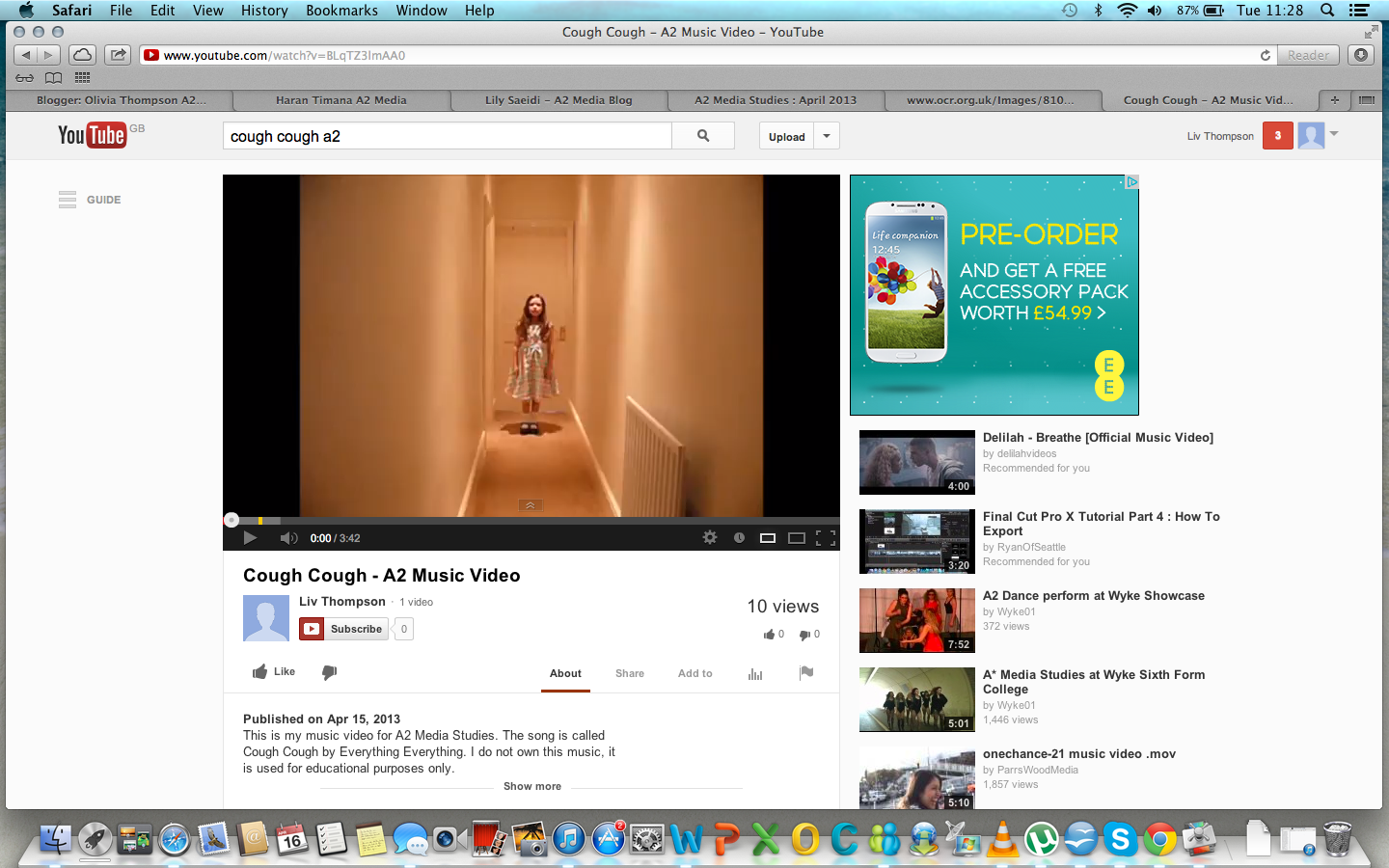
I posted a status and shared my video on to Facebook the day after I put it on YouTube. As you can see in less than a week, 10 people have liked my status and four have commented. One person commented on which particular bit of the video they liked the most, it was nice to see that someone had a favourite bit in my video. Others commented on how good they thought my video is and how I or my video could be successful in the future. This was a nice reaction from my friends and family, helping me to feel even more successful with my finished product. Below is a screenshot of the YouTube page of my video. Here you can see that in less than a week I have received 74 views. Since putting my video on it has gained more views considerably which I am very pleased with.


Uploading to YouTube

After completing my music video I decided to upload it on to the video sharing website YouTube. I chose this site in particular because it is the most popular one around the world, therefore it would give my video a lot of exposure. When I first exported my video I had a lot of trouble putting it onto YouTube as the file format needing changing and it needed to be compressed. I finally converted it from an MOV to an FLV so that it would upload quickly and would still be good quality on YouTube. When I uploaded the video, I changed the name of it and added a description. I also added particular words as tags so that when people search with specific words such as 'cough' or 'A2' my video would come up. At the moment my music video has 10 views on YouTube as i only uploaded it late last night. I am going to put a link to the video on my Facebook so that it can get lots of exposure and so that more people can leave me some feedback on it. 


Final Music Video


Editing my Music Video

My original plan was to get all of the filming out of the way first and then begin to edit it and put it together. However half way through the filming process I thought it would be best to start putting the video together to get a sense of what it was going to look like. To edit my music video I thought it would be best to use my Apple Macbook Air as it is recently new. It also has Final Cut Pro X on it, which is one of the top editing softwares for Apple when creating media. These were both superb assets to have when I was editing my music video, as they were of a high standard, reliable and easy to use for myself.


When I came to edit my music video, I realised that I hadn't got enough footage to last the whole 3:42 of the song. This is when I had to do some more filming and decided to do it in my back garden and the little woods. When I had finally got all of the footage I needed I worked hard on the editing to get it exactly how I wanted it to look. All together I spent about three days editing my video, until I finally completed it to my high standard. 

As my music video is concept based and doesn't have a narrative storyline it was fairly easy to edit. I wanted Teagan to look innocent and sweet on certain parts and then suddenly change to an evil side of her. This was the only plan that I wanted to follow throughout my video, which I did. I most certainly wanted my video to be edited to the beat of the song, as this is why I chose this particular song at the beginning of the project. It has a cutting and edgy, fast beat to it which was effective to edit to with the more sinister footage of Teagan. 

Mainly at the start of my music video and on a few other parts of the chorus, I have added text onto the screen. At the very beginning of the video the word 'cough' appears multiple times to the word being said in the song. I chose to do this because it looked very effective and also because Everything Everything did a similar text in their own video for the song. Also on certain strong words in the chorus I used the same text as I thought it was bold and was edgy. The font I used was 'sacrificial' off dafonts.com, which I have used for the majority of my ancillary tasks. This is so that all of my promotions for the band, as well as their own video are consistent throughout.


Everything Everythings 'cough' text

My Music Video 'cough' text

Whilst editing my video I decided the more effects there were, the better. I wanted Teagan to look cute in certain parts and scary in others, therefore I used many effects on my footage that Final Cut Pro X had to offer. For the innocent images and videos I put them in slow motion or just added a softer tone onto them. This made them look lighter in colour and appearance to the opposite footage. For the sinister side of Teagan I used dark and shadowed effects and filters. I also reversed the clips and fast forwarded them to make them look quick and scary for the viewer. If there were still images then I would add on certain effects that make them look like they are moving such as 'bad tv' or 'projector'. All of these effects, filters and speed differences were added onto the clips which created the music video I wanted to achieve. 

For the chorus of my video I decided to repeat the videos and images shown, changing them slightly. I thought this was a good idea as the lyrics to the chorus are obviously repeated throughout the song. Every time the chorus said the same lyrics, my video would show the same footage. However on the second time its repeated I have changed the images that flash up. This is so that the viewer can see other footage and it changes it slightly when repeated. 

As I was creating a music video I wouldn't of needed the diegetic sound that was on each single video I had taken. Therefore I detached the audio that was on the videos and deleted them, leaving just the non-diegetic sound of the music track that was over the top. This reduced any unwanted background noise that wasn't needed and that would make my music video look and sound unprofessional. 


Filming My Music Video

Cast and Crew

I asked my eight year old sister, Teagan to be in my music video as I wanted a young girl to be the main focus. When she agreed to help me I knew that I didn't want anybody else in my video as it wouldn't follow the theme I had in mind. I didnt even want the public walking by as I thought this would distract the viewer from the main focus of Teagan. I didn't want to star in my own video as I knew it would be impossible with me directing, filming and editing. Although I filmed all of the footage myself I did have a helping hand from my other sister and my mum. This was due to me not being able to film Teagan and also help her with props and costume. A few pictures i took that I have used for my ancillary tasks are when I got my mum and sister involved. Below is an image of Teagan and her hair is blowing about, here I took the pictures whilst my mum and sister got multiple hair dryers and crouched beneath Teagan to blow her hair up in the air. These photos turned out to be very effective and important, so I am glad I got the extra help from my family.


Time

It took me around three weeks all together to film my video, with pauses in between due to doing other work, availability of me and Teagan and also the weather. Although things got in the way and stopped me filming at times I still pushed ahead to get the appropriate footage I wanted. 

Filming the Video

On the first day of filming it was snowing, however I decided this would be a good effect on the images and videos I could take. I drove me and my sister to Cannock Chase in the morning with her all ready in her costume. I made sure that I had all of the necessary equipment with me to film her. I spent about an hour taking pictures and filming her in the snow, however we then decided that it was too cold to carry on and i felt that I had enough footage of what I wanted in the snow anyway. 


The day after, as the snow was still there, I decided to take some pictures inside of Teagan standing against a plain wall as the backdrop. This was a good day to film due to the weather and the footage that I needed to capture. I took a lot of photos on this day with the help of my mum and sister, with the ancillary tasks in mind. 

On the next day of filming it was nearly a week ahead, as i was waiting for the majority of the snow to melt away. Again we headed up to Cannock Chase, around the same area of woodland with the right equipment, props and costume. Although there was still snow, a lot of it had melted away, therefore it wasn't as cold and we could film for a bit longer than the last time. We took more images and videos until I decided I had enough of the footage I was after. 


The next day I filmed, we travelled to Burton to film inside my nans house as she has a narrow landing that I specifically wanted in my music video. I brought all of the appropriate equipment and costumes with me and set it all up upstairs. First I filmed down the landing which I had in mind for quite a while. However I then decided to film in one of my nans bedrooms as it is Teagan's and is pink and innocent looking. I got her to play with the toys and rocking chair in there to portray her as a sweet young girl.

On the final day of filming I decided to film Teagan in our back garden and also the little woods behind our house. I thought these were nice locations that suited my music video and they were also different scenery for the viewer to look at. I took pictures and filmed her in both areas until I knew I had enough footage for the whole of my video. 


Ancillary Task - Website

Another ancillary task was to create a website for my chosen artist and their upcoming album. I chose to use a free service called weebly.com, this was because it was free and easy to use and also included everything that I wanted to put on my website. For the main design of my website I chose a specific style and colour background that I thought suited my them and image in mind. When it came to the text, unfortunately I couldn't use the same font from dafonts.com as I have used on everything else as it wasn't on the website. However I did find a suitable text that went well with my chosen design and what I wanted my website to look like. After choosing my font and lay out, I decided to insert a picture of Teagan to be shown on every page so that all of the website would be consistent. 


A website can give an audience a lot more details about an artist and their album, therefore I thought this task was an important one to do. Whilst making my website I kept on looking at Everything Everything's official website to get ideas of what to include on my own. Below is the link to the bands official website.

About the Band

On the home page I wanted to keep it simple and just tell the viewer the background of the band. I inserted a picture of the band so that the viewer can acknowledge what they look like.   I then got information about the band from wikipedia and put it on my web page 'About the Band'. Also in the top right hand corner of the website there are two popular symbols of Facebook and Twitter, these are links to the bands official social network pages so that the audience can like and follow the band. 

Gallery

On the next page I decided to make a gallery of the band and the music video I had made. I inserted a few pictures of the actual band and their album cover, followed by images from my music video. These are interesting for the audience to look at as they can see different pictures of the band and video and may influence them to buy the album.

Videos

I decided to make a page specifically for the artists videos for the audience to view. Here I have put on the three latest official videos from Everything Everything. The first obviously being 'Cough Cough' the next being their second release from their album 'Kemosabe' and the last is their latest release off of the album 'Duet. I have also added my own music video onto this web page.

Contact Us

This web page allows the viewer to contact the band. The audience can type their first and last name and also type in their email address for the band to send them promotions, deals and news and also to possibly contact them back. The audience can also leave a comment to the band, for fans to give feedback or express their love of the music etc. 


Below is the link to my website that I have made.